

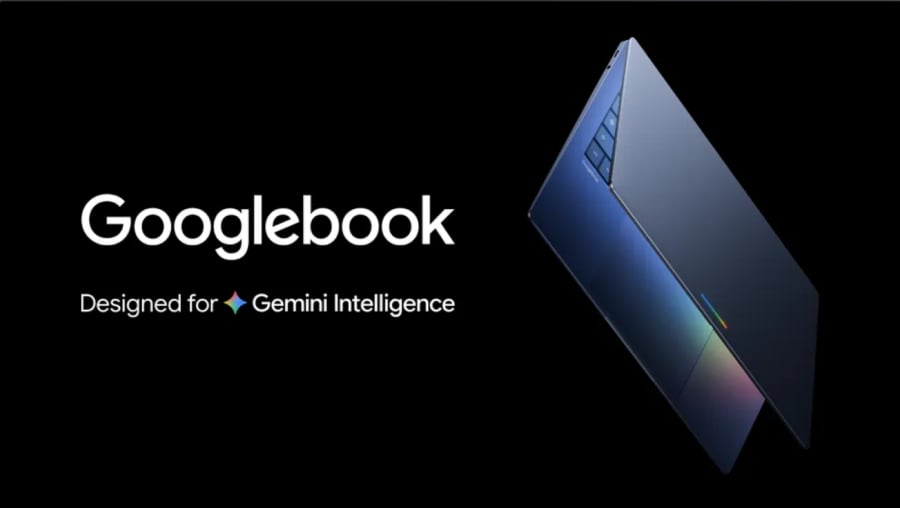
Google Introduces Googlebook, a Gemini-First Laptop Platform
During a virtual event called The Android Show, Google announced a brand-new category of personal computers called the Googlebook. Positioned as a major evolutionary step beyond the web-first Chromebooks that debuted back in 2011, these new machines are built to place AI at the center of the daily user experience. According to a Google blog post by Senior Director Alex Kuscher, the company is looking to move past traditional setups. “Over 15 years ago, we introduced the Chromebook, a laptop built for a cloud-first world,” Kuscher noted, adding that as computing shifts toward AI, “we see an opportunity to rethink laptops again.” Rather than relying purely on ChromeOS, Googlebooks will run on a modern operating system that blends elements of ChromeOS with the Android tech stack. Google said the devices are “the first laptops designed from the ground up for Gemini Intelligence.”
The Magic Pointer and Custom Dashboards
The standout software feature of the Googlebook is a reimagined cursor experience called the Magic Pointer. Developed in collaboration with the Google DeepMind team, the feature activates a full-screen Gemini AI experience when a user wiggles their mouse cursor. The AI analyzes what is currently displayed on the screen to offer context-aware suggestions. For instance, pointing the cursor at a date in an email lets users instantly schedule a calendar appointment. Technical demonstrations also showed the Magic Pointer selecting multiple images and instantly visualizing them together. The laptops will also feature “Magic Cue,” a tool transitioned from Pixel smartphones that suggests actions based on the context of messages and emails. Additionally, users can leverage a “Create your Widget” tool, which uses natural language prompts to assemble a personalized desktop dashboard drawing from the live web and connected Google accounts like Gmail and Calendar.
The Magic Pointer represents a radical departure from traditional cursor interactions. Instead of merely clicking or dragging, the cursor becomes an intelligent agent that understands the content on screen. This is possible because Gemini, Google's most advanced AI model, runs locally or in the cloud to process visual and textual data in real time. The DeepMind collaboration ensures that the AI understands not just text but also images, layouts, and even user intentions. For example, if a user is looking at a spreadsheet with sales data and wiggles the cursor, Gemini might offer to create a chart, calculate totals, or send an email summarizing the data. This level of integration blurs the line between operating system and AI assistant, making the Googlebook a truly intelligent device.
Deep Android Integration
By utilizing an underlying Android-based software architecture, Googlebooks aim to deliver a highly interconnected multi-device ecosystem. Users will be able to access the Google Play Store to run Android apps natively on their laptops. For apps that aren’t installed locally, a dedicated taskbar button will allow users to stream applications directly from a nearby Android smartphone into a floating window on the laptop screen. Sharing files across devices has also been streamlined via a feature called Quick Access. Kuscher highlighted the convenience of the tool, writing, “We’re also making it incredibly easy to access files from your phone right from your Googlebook’s file browser.” He added, “With Quick Access, you can easily view, search or insert your phone’s files on your laptop — no transfers needed.”
This deep Android integration marks a significant shift for Google's laptop strategy. Chromebooks have long had access to Android apps, but the experience was often limited by the ChromeOS architecture. Googlebook's new OS, built from a fusion of ChromeOS and Android, promises seamless performance. The ability to stream apps from a phone means that users don't have to worry about storage or compatibility issues. For instance, a user can run a mobile-only banking app on their laptop without installing it, simply by connecting to their phone. Quick Access further eliminates the need for cloud uploads or USB cables, making file sharing instantaneous. This ecosystem approach is reminiscent of Apple's Continuity features, but Google is leveraging its massive Android user base to create a more open and flexible environment.
Premium Hardware and the Mystery Glowbar
While Google has not announced plans to manufacture its own first-party Googlebook hardware, the company is partnering with major industry manufacturers, including Acer, ASUS, Dell, HP, and Lenovo. To differentiate the devices from traditional laptops, every Googlebook will feature a distinct, illuminated LED strip on its lid known as a “glowbar.” While reminiscent of the battery-indicator light bars found on older Google hardware, Google has only stated that the new glowbar is “functional and beautiful” without yet disclosing its specific day-to-day capabilities. Industry speculation suggests the glowbar could serve as a notification light, indicating incoming calls, messages, or AI activity. It might also change color based on the device's status, such as recording audio or processing a complex AI task.
The partnership with top-tier manufacturers indicates that Googlebook is aiming for the premium segment. Unlike budget Chromebooks that dominated education and low-cost markets, Googlebook will likely feature high-resolution displays, all-day battery life, and premium materials like aluminum or carbon fiber. Acer and ASUS are expected to produce models with 13- to 16-inch screens, while Dell and HP may target enterprise users with security features. Pricing is still unconfirmed, but early indications suggest devices will start around $699 and go up to $1,299, competing directly with Apple's MacBook Air and Microsoft's Surface Laptop. The glowbar could become a signature design element, much like the notch on iPhones or the Touch Bar on older MacBooks.
Historical Context and Market Positioning
The Googlebook launch comes at a pivotal moment in the laptop market. Chromebooks, which once seemed poised to dominate education and casual use, have faced stagnation due to limited offline capabilities and the rise of tablets. Meanwhile, Apple's M-series chips have redefined laptop performance, and Microsoft's Copilot+ PCs are integrating AI into Windows. Google's response with Googlebook is to create an AI-first platform that leverages its strengths in cloud computing, machine learning, and Android. The decision to blend ChromeOS and Android into a new OS allows Google to unify its software experiences across devices, much like Apple's macOS and iOS integration.
From a technical standpoint, Googlebook's OS is a significant engineering achievement. It runs Android apps natively while retaining the security and simplicity of ChromeOS. The Gemini AI model is embedded at the system level, meaning every app and interaction can be enhanced with intelligence. For example, the system can automatically optimize battery life based on usage patterns, suggest files based on context, or even generate meeting notes from audio recordings. The Magic Pointer is just one facet of this AI integration; future updates could bring even deeper capabilities, such as real-time translation of any on-screen text or voice control over any application.
Implications for Users and Developers
For end users, the Googlebook promises a more intuitive and productive computing experience. The ability to quickly schedule events from emails, manipulate images with simple gestures, or build custom widgets without coding could reduce friction in daily tasks. Professionals who rely on multiple devices will benefit from seamless phone integration, reducing the need to constantly switch between devices. Students and educators may find the AI features particularly useful for research and collaboration. For developers, the Googlebook opens up new opportunities to create AI-powered applications using Gemini APIs. The deep Android integration means that existing Android apps can be optimized for laptop screens with minimal effort, and new apps can leverage the Magic Pointer and context-aware features.
However, there are challenges. The reliance on AI and cloud connectivity means that Googlebook may not appeal to users who prioritize offline performance or privacy. Google has stated that many AI features will work locally, but some tasks may require an internet connection. Additionally, the company's history with privacy has been a concern, and Google will need to clearly communicate how user data is handled. The lack of first-party hardware also raises questions about quality control, though Google's partnerships with established manufacturers should mitigate this.
Googlebook is still in the preview stage, with more details coming closer to launch later this year. No official pricing or specifications have been released yet, but early indications suggest the devices will sit in the mid-to-premium laptop category rather than the budget Chromebook segment. As the laptop market evolves, the Googlebook represents a bold bet on AI as the defining feature of personal computing. Whether it can displace traditional laptops or carve out its own niche will depend on execution, pricing, and the quality of the AI experience. The glowbar may soon become a common sight in coffee shops and offices, signaling a new era of intelligent laptops.
Source: TechRepublic News